
Pixzy.ai / Duplicate cleanup
Local Duplicate Finder for Google Photos™
Find and delete the duplicate Google Photos that Google misses.
Google Photos only blocks identical file uploads. Resized downloads, WhatsApp saves, cropped edits, and camera bursts slip right through. Pixzy groups look-alike shots inside your browser—keeping Favorites and album photos protected while you review what goes to Trash.
On a phone? The extension runs in desktop Chrome. Open this page on your computer to install it.
- 4.6160 ratings
- 15,000+active users
- Locallibrary stays in browser
Source: Chrome Web Store listing, 2026-11-16
Google Photos™ is a trademark of Google LLC. Pixzy is an independent tool and is not affiliated with Google.
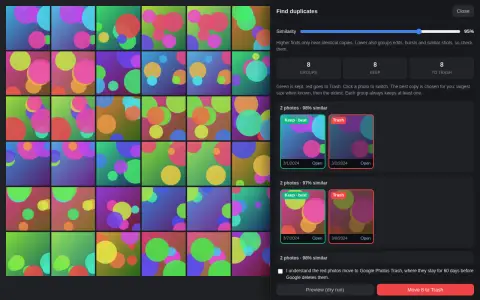
Review look-alike bursts without uploading your library
Every scan runs inside the photos.google.com tab you already have open—no external cloud access, no password sharing, and no guessing.
- 1
Scan in your browser
Open your Google Photos library, an album, or a search view. Pixzy compares photo previews right on your computer and remembers progress across large libraries so you can pause and pick up later.
- 2
Check keepers & bursts
Slide similarity to 95%+ for near-identical re-saves, or lower to catch rapid camera bursts. Favorited (★) and album-curated shots are protected by default, and every group always keeps at least one copy.
- 3
Dry Run, then Trash
Preview the exact match count with a click-free Dry Run first. Confirm once to move extras to Google Photos Trash in verified batches of up to 500 with Pause, Resume, and Stop.
Built for 10,000+ photo archives
Keep the sharpest shot. Export a CSV record before anything moves.
Cleaning a few dozen duplicates by hand is easy with the free visual reviewer. When you have years of burst sequences and re-imported backups, Personal Pro ($19 one-time) turns hours of clicking into a verified checklist.
- Keep best resolution & Favorites automatically: Favorited (★) photos rank first as your keeper, followed by highest pixel resolution and earliest capture date.
- Global Keep Newest / Keep Oldest (Pro): Flip every duplicate group across a big scan in one click while keeping manual overrides intact.
- 1-Click Auto-Accept ≥ 98% (Pro): Fast-track near-identical re-uploads while leaving looser burst groups open for your eye.
- Local CSV Audit Export (Pro): Download your full keep-and-trash decision list as a CSV file on your computer before moving a single photo to Trash, and turn your surviving keepers into 720p/1080p MP4 highlight reels in Memories Studio.

How Pixzy compares on Google Photos duplicates
| Capability | Google Photos Built-In Check | External Cloud Scanners | Pixzy (In-Browser Extension) |
|---|---|---|---|
| Resized, edited & burst duplicates | Misses them (blocks exact byte-identical uploads only) | Cannot read full Google Photos libraries since March 2025 API change | Groups visual look-alikes & bursts directly in Chrome with adjustable similarity |
| Where your photos go | Stays in Google Photos | Requires downloading & re-uploading elsewhere | Stays in your browser tab—zero library uploads |
| Favorites (★) & album safety | Manual check on every photo | No awareness of Google Photos Favorites | Favorited (★) & album-curated photos protected by default |
| Bulk rules & CSV audit log | None | Recurring monthly subscriptions | Free manual review; $19 one-time Personal Pro for bulk rules & CSV export |
Frequently asked questions
Why doesn't Google Photos remove duplicate photos automatically?
Google Photos only blocks identical file uploads that have the exact same file bytes. Resized copies, messaging-app saves, cropped edits, and camera burst sequences have different file bytes, so they stay in your library. Pixzy compares visual similarity directly in your browser to group them together.
Does Pixzy upload my photos to scan for duplicates?
No. Duplicate scanning, visual comparison, and moving extras to Trash happen inside the Google Photos tab already open in your browser. Your library is never uploaded to Pixzy.
Can I recover deleted duplicates if I change my mind?
Yes, while the items remain in Google Photos Trash under Google's current retention policy (up to 60 days for backed-up items; a full Trash may prompt permanent deletion). Pixzy never empties Trash unless you separately opt in and confirm Empty Trash.
What is free forever vs included in the $19 Personal Pro upgrade?
Finding duplicates, adjusting the similarity slider, protecting Favorited and album photos, swapping keepers, running a Dry Run, and moving extras to Trash in batches of up to 500 are free forever. Personal Pro ($19 one-time, or $29.97 Family for 3 seats / $49 Team for 10 seats) adds global Keep Newest or Keep Oldest rules, 1-click Auto-Accept for 98%+ matches, media and date filters, 20 saved presets, and CSV decision downloads.
More ways to clean up and rescue your library
Bulk delete Google Photos by year or date
Clear thousands of photos from a date window or media type without manual 500-item scrolling.
Read guide → 15 GB QuotaFree up Google Photos storage fast
Sweep old screenshots, large videos, and burst clutter before paying for extra cloud storage.
Read guide → AI HD RestoreRestore blurry & old family photos
Unblur soft or scanned portraits up to crisp 1024×1024 HD—3 free restores, failed restores cost 0.
Read guide →Clear duplicate clutter while keeping every real memory
Run your first duplicate scan free in desktop Chrome—nothing moves until you review and confirm.