
Free Chrome extension for Google Photos
Bulk delete Google Photos. Find the duplicates it misses.
Pick a view, preview exactly what will go, then delete thousands of photos in one run, in safe batches of up to 500. Everything runs in your browser.
On a phone? The extension runs in desktop Chrome. Open this page on your computer to install it.
- 4.6160 ratings
- 15,000+users
- MITopen source
Source: Chrome Web Store listing, 2026-11-16
Three steps, and you stay in control
- 1
Open the view
Your whole library, an album or a search in Google Photos. That view is the only thing the tool touches.
- 2
Dry run
It scrolls and counts what matches without clicking anything, so you see the number before you commit.
- 3
Delete in batches
Confirm once, then watch it work through batches of up to 500. Pause, resume or stop at any time.
Built so you never lose the wrong photo
Nothing runs until you confirm
The first real run asks you to confirm what is about to happen. Nothing is ever scheduled or unattended.
Recovery has limits
Restore only while items remain in Trash, within Google Photos’ current retention policy. Empty Trash is optional, asks first and cannot be undone.
Google Photos desktop delete guidance (checked 2026-10-29) · Google Photos desktop restore guidance (checked 2026-10-29)
Stops instead of guessing
If Google changes a button the tool cannot positively identify, it stops. It never clicks something it is unsure of.
Scanning stays on your computer
Finding duplicates, spotting blurry shots and deleting run in your browser with zero photo uploads. AI Photo Restore sends only the photo you confirm to Sylphx AI. Memories MP4 export stays local unless you explicitly save it to Google Photos.
Find the look-alikes Google keeps
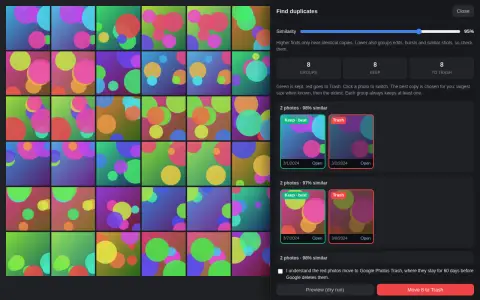
Google Photos removes only exact copies. Resized, re-saved, lightly edited or twice-uploaded copies stay. Find duplicates groups them, keeps the best copy and marks the rest for Trash.
- Set how strict the match is with a similarity slider.
- Every group always keeps at least one photo. Click any photo to switch it.
- Free, and it works on tens of thousands of photos.
Why an extension
Since 31 March 2025, Google no longer lets apps read your whole library through the Photos API, so outside duplicate finders cannot scan your whole library. This tool works inside the Google Photos page you already have open.
Restore the blurry ones worth keeping
The Blurry / Low-Res view finds soft and small photos on your computer. Move junk shots to Trash, or restore a photo you love in HD and compare before and after with a slider.
Only the photo you confirm is sent, over HTTPS to Sylphx AI. It is processed in memory, no copy is kept, and it is never used to train AI models. New accounts get 3 free trial credits.
Turn your keepers into a memory
Memories Studio helps you choose sharp photos, review near-duplicates and arrange a reel in portrait, landscape or square. You choose the final frames.
A local MP4, not a cloud render
Your browser encodes an H.264 MP4 with WebCodecs. Preview it and download it without sending photos or video to Sylphx. If your browser cannot encode it, export stops without charging credits.
Free: 720p with a “Made with Google Photos Delete Tool” end-card. No login or payment needed.
More detail when you want it
The US$4.99/mo Monthly Pass unlocks unlimited 1080p exports without the branded end-card while your subscription is active, plus 50 AI restore credits each month. Enhancing one frame in HD uses 1 credit and asks before sending that photo to Sylphx AI.
Keep the download, or explicitly choose Save to Google Photos. That uploads the finished MP4 through Google’s native interface, not through Sylphx. Your originals are never deleted; a failed upload leaves your local MP4 available.
Install the extension first, then open Memories Studio from its panel in Google Photos. WebCodecs H.264 support is required. The Monthly Pass is separate from the one-time Pro licence below. Terms and cancellation · How your photos are handled
Free for good. Pro when you clean up often.
Pro is from US$19, one-time. Personal US$19, Family US$29.97, Team US$49. No subscription, no account.
Free
US$0
- Bulk delete in batches of up to 500
- Dry run that clicks nothing
- Find duplicates, including look-alikes
- Optional Empty trash, checked afterwards
- Pause, resume and stop
- Interface in 10 languages
Pro
from US$19 one-time
Personal US$19 · Family US$29.97 · Team US$49
- Everything in Free
- Type filters: only screenshots, videos, photos, animations or collages
- Date filter: before, after or between two dates (dates shown in English or French)
- Up to 20 saved presets for cleanups you repeat
- Duplicate tools: keep the newest or oldest in every group, auto-accept groups 98% or more alike, CSV export
- Dry-run report with CSV export
Pro is a token you paste into the extension. It is checked on your device and works offline.
Questions
Can I undo a delete?
Only if the items are still in Trash and Google Photos’ current policy allows it. Open Google Photos Trash, select the items and choose Restore. Empty Trash and any permanent deletion cannot be undone. A full Trash may prompt permanent deletion instead. Check Google’s guidance before deleting.
Google Photos desktop delete guidance (checked 2026-10-29) · Google Photos desktop restore guidance (checked 2026-10-29)
Does it upload my photos?
Not for scanning or deleting. It runs inside the Google Photos page in your browser. Find duplicates downloads small thumbnails only from Google's own servers, turns each into a fingerprint in memory and forgets it when you close the review. Only if you confirm AI Photo Restore on one photo is that photo sent over HTTPS to Sylphx AI, which processes it in memory and keeps no copy. Memories MP4 export is local; saving it to Google Photos is a separate, explicit upload through Google’s own interface.
Can I delete only part of my library?
Yes. Open an album or a search and the tool acts on that view only. Pro adds type and date filters for finer control.
Which browsers does it work in?
Desktop Chrome, and Chromium browsers that install from the Chrome Web Store. A userscript for Tampermonkey or Violentmonkey is on GitHub. It does not run on phones.
Is it made by Google?
No. It is made by Sylphx Limited and is not affiliated with or endorsed by Google.
How do I get help?
Email hi@sylphx.com or open an issue on GitHub.
Clear out your library today
Free, open source, and a dry run before anything is touched.
Add to Chrome, it's free